

In today’s fast-paced world, business travelers are seeking hotel experiences that are not only...
Imagine a group of friends eagerly planning a year-end getaway, or a three-generation family looking for a resort for their summer vacation. The joy of planning can sometimes turn into a puzzle: how many rooms are needed to fit everyone? Which room type is suitable for the number of accompanying children? How many choices must they scroll through to find the perfect combination?
That is exactly why Hotel Link launched the new Smarter Room Search interface on our Booking Widget – a smart solution that helps guests find and book the right rooms faster, making it especially useful for large groups or guests with complex room requirements.
What’s New in the Smarter Room Search Interface?
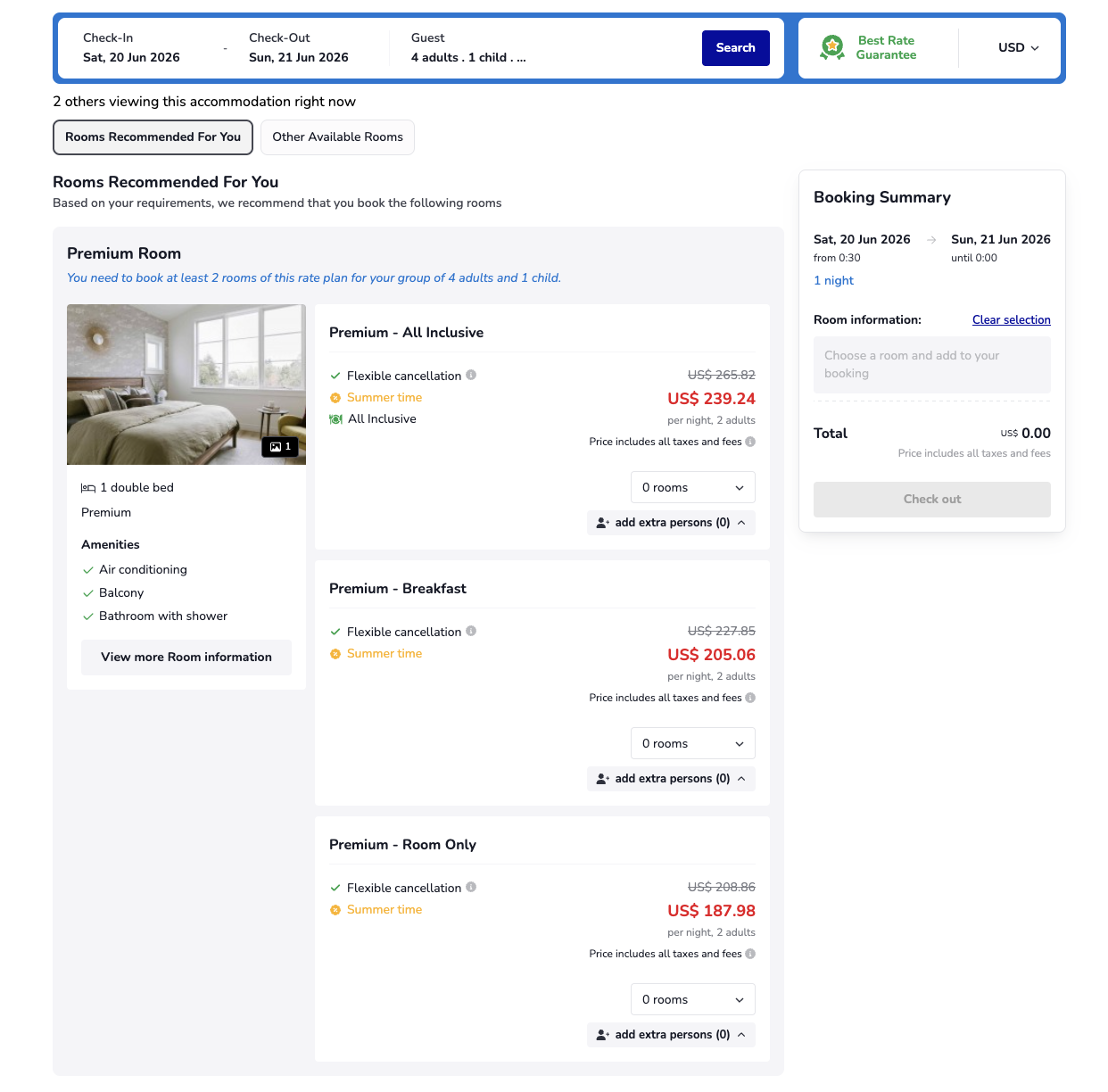
1. "Number of Rooms" Field Added from the Initial Search Step
Previously, guests booking in groups usually just entered the total number of people, then had to manually calculate and allocate guests into each room in the subsequent steps. To eliminate this inconvenience, Booking Widget has added the "Number of Rooms" field right into the initial search form.
This update brings massive benefits to hotels as the system immediately captures the actual demand of group or family travelers to return the most accurate results. Instead of letting guests navigate through each room category blindly and guess how many rooms to book, this feature accurately captures the guest's booking intent from the very first second, significantly reducing bounce rates caused by confusion.
2. Rooms Recommended For You – Optimal Room Packages to Drive Faster Decision-Making
This is the highlight that drives conversion rates in this version. Immediately after guests hit search, a brand-new section called Rooms Recommended For You will appear at the highest priority position on the results page.
Here, the system automatically handles complex algorithms to group and display room packages that precisely meet both criteria: providing enough rooms as requested and ensuring a comfortable space for all accompanying members. Each recommendation comes with an intuitive helpful hint, so guests know exactly how many rooms of this package to book. Guests no longer have to hesitate and compare dozens of individual options, speeding up the booking and checkout process.
3. Other Available Rooms – Organized Layout to Retain Guests
For guests who want the freedom to explore other options, the Other Available Rooms section (renamed from the current room list) will display all available rooms during their stay, excluding the rooms already optimized in the recommendation section above.
The familiar search experience remains unchanged, but the interface has been reorganized to be much cleaner and more structured. This clear separation makes the hotel's website look professional and clutter-free, allowing guests to easily track and proactively compare rooms for potential upgrades if desired.
4. "Clear Selection" Button – Clear the Cart with a Single Click
When guests select the wrong room or want to change their arrangement after some consideration, they often face difficulties having to manually delete each room individually. The new Clear Selection button in the Booking Summary was born to completely solve this problem.
This feature offers maximum flexibility for the user experience (UX) as a single click will instantly clear all previously selected rooms, leaving guests ready to start a new plan. This smooth, friction-free process will keep guests engaged with the direct booking channel longer.
5. Clearer Empty States – Transparent Information to Retain Guests When Fully Booked
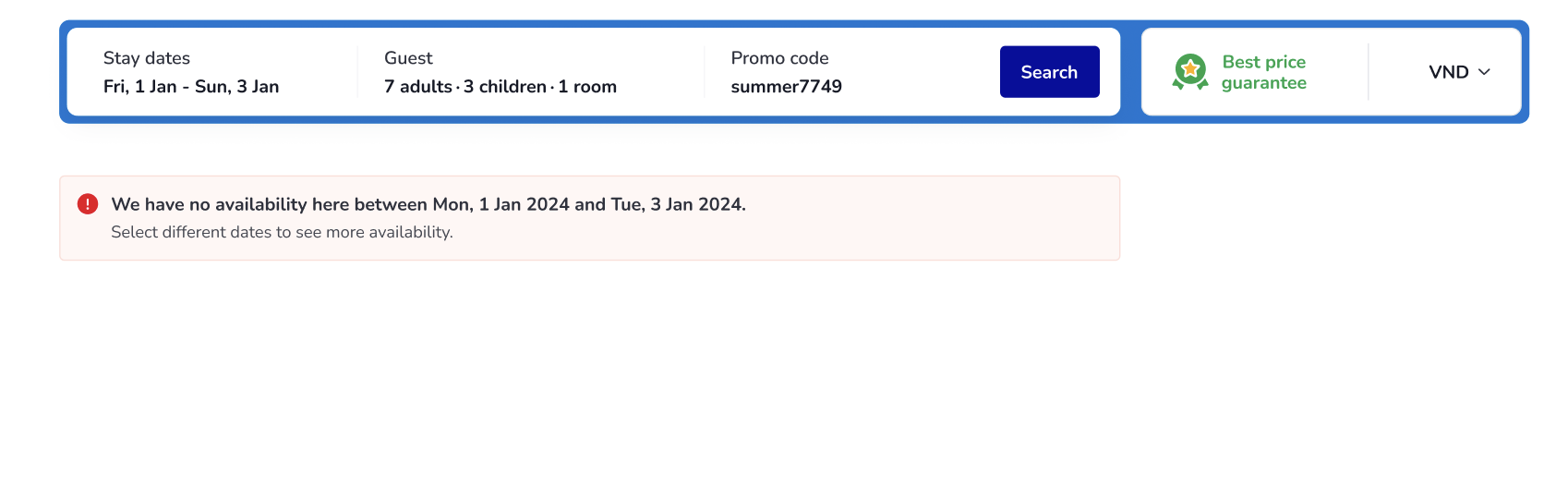
Nothing loses a customer faster than hitting search only to face a blank page with no alternative solutions. With the improved interface for unavailable dates (Clearer Empty States), the system will display a clear and polite message, while proactively suggesting alternative stay dates.
Instead of letting guests leave for OTA channels when their selected dates are fully booked, this feature acts as an intelligent navigator, encouraging guests to flexibly adjust their schedules and continue booking with the hotel, thereby maximizing direct revenue for the hotel.
Conclusion
With the aforementioned enhancements heavily focused on user experience, the guest's room-hunting journey on the Booking Widget has become more intuitive, fast, and reliable than ever – especially for larger groups, which have always been a challenge in room optimization. When guests can easily find the right choice from the start, the direct booking journey becomes seamless and hesitation-free. For hotel managers, this is a powerful weapon to minimize cart abandonment rates and drive strong direct booking revenue growth.
The Smarter Room Search feature has been officially activated on the system starting today! Please access your Extranet or check your hotel's Booking Widget interface now to experience and maximize the power of this next-generation upgrade!
Don't let a complex booking process reduce your hotel's conversion opportunities! Contact Hotel Link today for guidance on activating and optimizing the latest Smarter Room Search interface on your website.